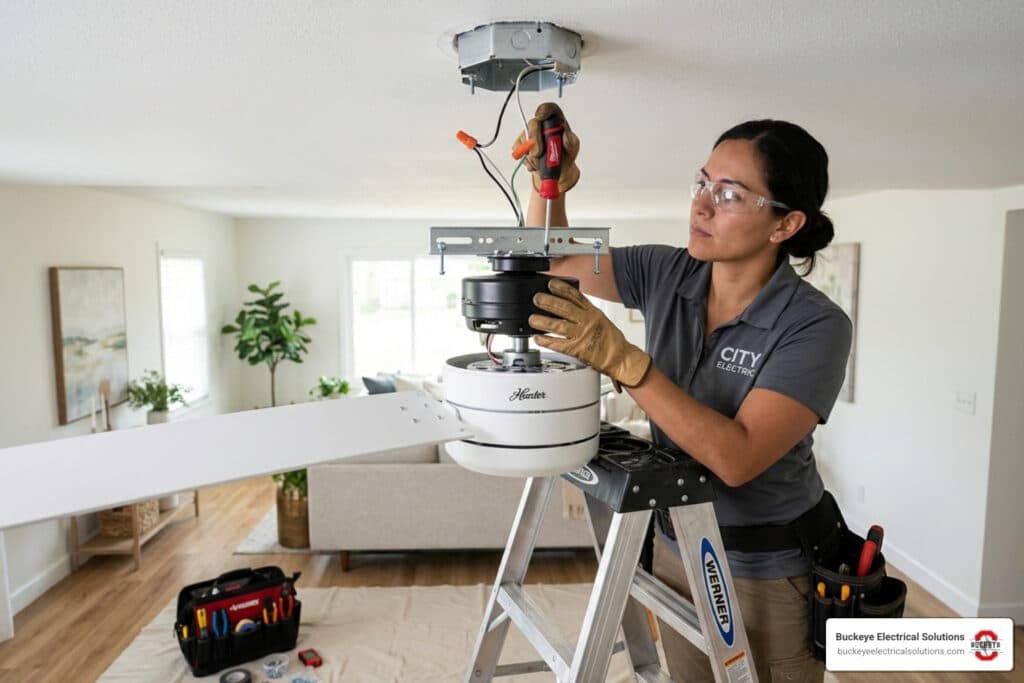
What You Need to Know Before Wiring a Ceiling Fan and Light
Wiring a ceiling fan and light comes down to matching the right wires, using the right controls, and making sure the power is off before you touch anything.
Here’s a quick overview of how it works:
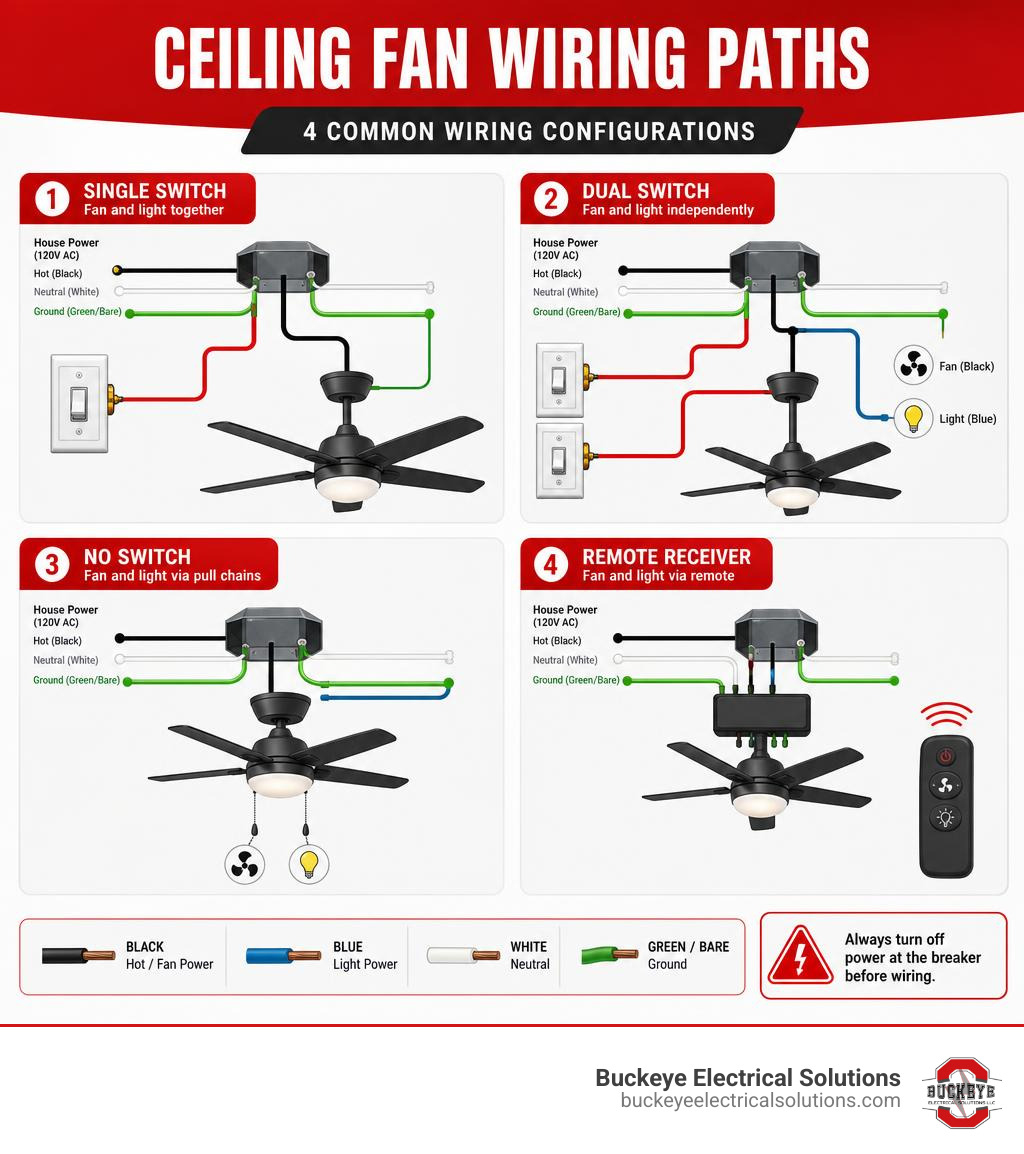
| Wiring Scenario | Wires Used | What It Controls |
|---|---|---|
| Single wall switch | Black, white, green/bare | Fan and light together |
| Dual wall switches | Black, red, white, green/bare | Fan and light independently |
| No wall switch | Black (or black + blue), white, green/bare | Fan and light via pull chains |
| Remote receiver | Black, white, green/bare + receiver | Fan and light via remote |
The core steps are always the same:
- Turn off the breaker and verify power is off with a voltage tester
- Connect grounds first (green or bare copper wires)
- Splice neutral wires (white to white)
- Connect hot wires based on your control setup (black, blue, and/or red)
- Secure all connections with listed wire connectors
- Restore power and test both fan and light functions
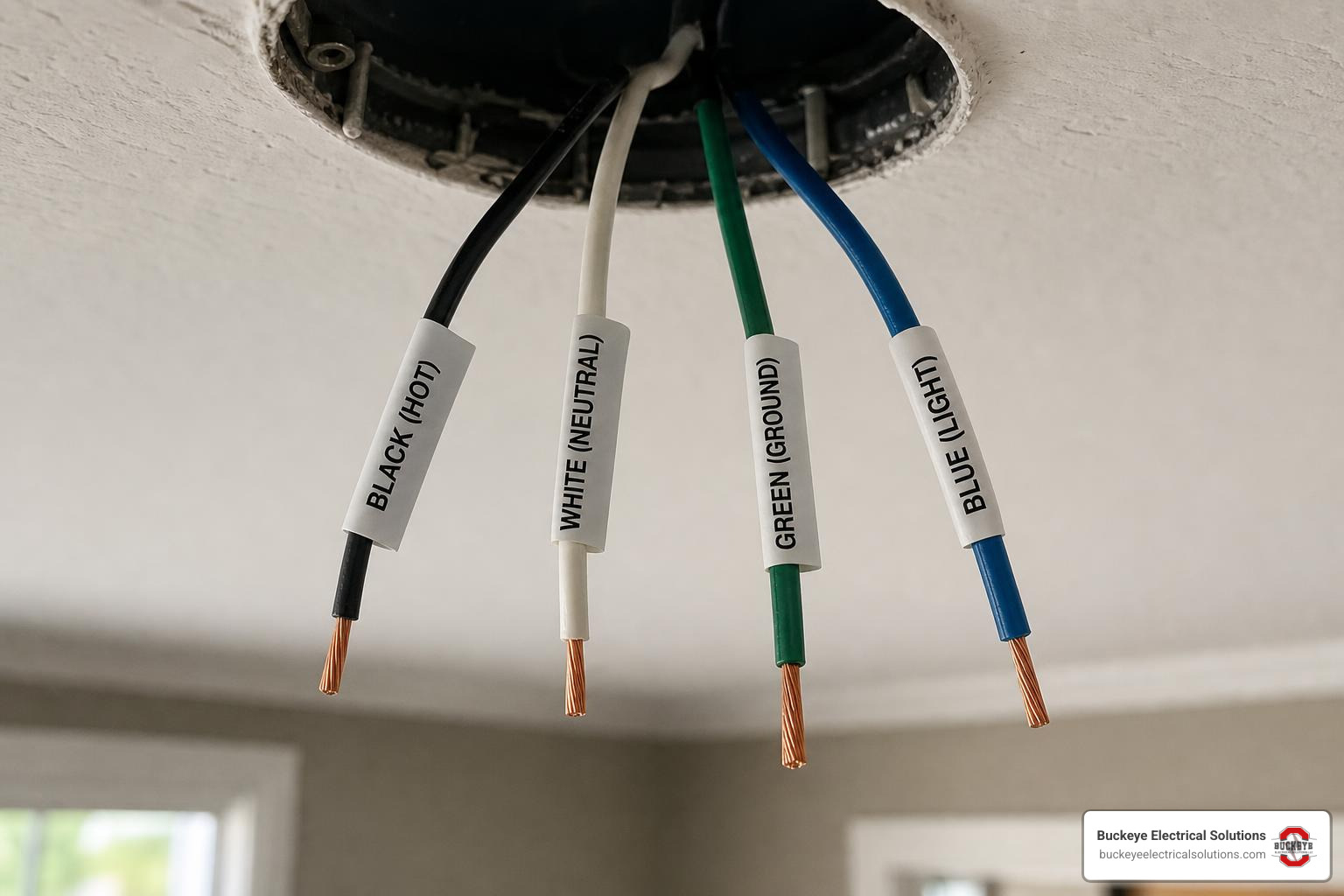
Most ceiling fans have four wires: black (fan hot), blue (light hot), white (neutral), and green or bare copper (ground). Whether you’re using one switch or two, the goal is getting the right wires to the right places — safely.
This guide covers every common wiring scenario for Ohio homeowners, from a basic single-switch setup to separate switches and remote receivers. It also covers what not to do — because a few small mistakes can cause real problems.
I’m Aaron, owner of Buckeye Electrical Solutions LLC and a master electrician with hands-on experience wiring ceiling fans and lights across dozens of residential and light commercial projects throughout Northeast Ohio. I’ll walk you through each scenario step by step so you can make smart decisions — whether you’re doing this yourself or calling in a pro.
When planning the process of wiring a ceiling fan and light, you may also find these related guides helpful:
Tools, Safety, and Ohio Code Basics Before You Start
Before we talk wire nuts and switch legs, we need to talk safety. Wiring a ceiling fan and light is not just about making the fan spin. It is also about supporting a moving load, grounding the equipment, protecting the circuit, and following the rules adopted by Ohio and your local authority having jurisdiction (AHJ).
A ceiling fan can help reduce cooling costs when used with air conditioning, but only if it is installed safely. A fan-rated electrical box is different from a standard light fixture box because it is built to handle weight and vibration. Many fan-rated boxes are marked for fan support and may be rated to support at least 70 pounds, but always verify the label and manufacturer instructions.
For structural installation guidance, start with our guide on attaching a ceiling fan safely.
Tools Needed Before Wiring a Ceiling Fan and Light
Have everything ready before you climb the ladder. You will typically need:
- Non-contact voltage tester and digital multimeter
- Wire strippers and needle-nose pliers
- Phillips and flathead screwdrivers
- Listed wire connectors sized for the conductors
- Electrical tape and a sturdy ladder
- Safety glasses, work gloves, and a headlamp
- Circuit labels or painter’s tape
- Approved ceiling fan-rated electrical box and mounting hardware
Most ceiling fan installations take about 1 to 2 hours when the correct box, wiring, and controls are already in place. If new cable, a new fan-rated box, or a new switch box is needed, the job becomes more involved.
For a broader home wiring foundation, see Power Up Your Knowledge: A Beginner’s Guide to Home Wiring.
Safety Checks That Come Before Any Wire Connection
Before touching any ceiling or switch wiring:
- Turn off the breaker, not just the wall switch.
- Verify power is off with a voltage tester.
- Test the voltage tester on a known live source before and after checking the circuit.
- Confirm the ceiling box is fan-rated.
- Check that the fan bracket is secured to framing or an approved brace.
- Confirm all grounds are present and continuous.
- Make sure the box is not overcrowded.
- Check the fan blade clearance (typically at least 7 feet from floor to blade).
- Follow the fan manufacturer’s installation instructions.
A standard ceiling light box is not designed for a fan motor’s movement and vibration. If you are unsure, read our guide to ceiling fan junction box basics.
Ohio-Specific Electrical Code Notes for Fan-Light Installations
In Ohio, electrical work must comply with applicable adopted codes, manufacturer listings, and local AHJ requirements. The National Electrical Code (NEC) is the model code used across the industry, but local enforcement details can vary.
Ohio’s 2023 NEC adoption includes expanded GFCI requirements in several locations. These specific rules, such as certain kitchen GFCI requirements, are highly situational rather than universal because they depend entirely on the specific location, equipment, circuit type, and the adopted code provisions enforced by the local AHJ. Bathrooms, garages, unfinished areas, laundry areas, basements, outdoor locations, and damp or wet areas may trigger additional requirements.
If you are installing a ceiling fan in a moisture-prone location, the fan and light must be properly listed for the environment (damp-rated or wet-rated).
You can review Ohio electrical system rules through the Ohio electrical system rules, but the practical takeaway is simple: check local requirements before starting, especially if you are adding new wiring, relocating switches, or modifying circuits.
Wiring a Ceiling Fan and Light: Wire Colors and Common Control Setups
Most modern fan-light combinations use a familiar set of wires:
| Wire Color | Typical Purpose | Notes |
|---|---|---|
| Black | Fan motor hot | Usually powers the fan |
| Blue | Light kit hot | Usually powers the light |
| White | Neutral | Shared return path for fan and light |
| Green or bare copper | Ground | Safety grounding conductor |
| Red | Second switched hot | Often used for separate light control |
| Yellow-green | Ground on some fixtures | Treat as equipment ground |
Wire colors are helpful, but they are not a substitute for testing and tracing. Older homes, reidentified conductors, switch loops, and DIY history can make wire colors less predictable.
For general reference, standard how-to resources such as How to Wire a Ceiling Fan and wiring diagram resources like Ceiling Fan/Light Kit Wiring Diagrams show common layouts, but your actual wiring must be verified on site.
How to Identify Ceiling Fan Wire Colors
Here is how the fan-side wires usually work:
- Black fan wire: Hot lead for the fan motor.
- Blue fan wire: Hot lead for the light kit.
- White fan wire: Neutral for both the fan and light.
- Green or bare copper fan wire: Equipment grounding conductor.
- Yellow-green wire: Ground wire on some imported or listed fixtures.
- Red ceiling wire: Often a second switched hot from a wall switch.
The ceiling box may contain a black hot, a red switched hot, a white neutral bundle, and bare copper or green grounds. Never assume a white wire is neutral until you verify the circuit. In older switch loops, a white wire may have been used as a hot conductor and should be marked accordingly.
Single Switch, Dual Switch, No Switch, and Remote Control Differences
The control setup determines how the hot wires connect.
| Setup | Best For | Typical Wiring Method | Main Limitation |
|---|---|---|---|
| Single wall switch | Simple rooms | One switched hot feeds fan and light | Fan and light turn on/off together unless pull chains are used |
| Dual wall switches | Independent control | One switched hot for fan, one for light | Usually needs 14-3 or 12-3 cable between switch and fan |
| No wall switch | Older rooms | Constant hot feeds fan/light controls | Less convenient and may not meet expectations for room control |
| Remote receiver | Convenience | Receiver sits in canopy and controls outputs | Must fit canopy and match fan type |
| Smart control | App, voice, schedules | Often needs neutral and separate loads | Compatibility must be checked carefully |
For separate fan and light switching, 3-conductor cable is commonly used between the switch box and ceiling box. On a 15-amp circuit, that is often 14-3 cable. On a 20-amp circuit, it may be 12-3 cable. The conductor size must match the circuit overcurrent protection.
Smart fan controls can be helpful, but many require a neutral in the switch box and separate fan and light load wires. A manufacturer’s smart ceiling fan control guide shows why identifying line, load, neutral, and ground matters before installing any smart device.
What to Check in the Ceiling Box and Switch Box
Before making connections, inspect both the ceiling box and switch box.
Check the ceiling box for:
- Fan-rated label or listed support system
- Secure attachment to framing or approved brace
- Adequate box fill capacity and cable type (e.g., 14-2, 14-3, 12-2, or 12-3)
- Neutral bundle and ground conductors
- Damaged insulation or loose clamps
Check the switch box for:
- Line feed and load wires
- Neutral bundle, especially for smart controls
- Grounding conductor and box fill capacity
- Properly capped unused wires
If you find brittle insulation, aluminum branch circuit wiring, missing grounding, or mystery wiring, stop and call a licensed electrician.
For more about circuit capacity and wiring choices, see Upgrade Your Watts: What You Need to Know About Electrical Wiring.
Step-by-Step Wiring Methods for Fan and Light Switch Control
The exact wiring depends on the fan, switch setup, and cable in the box. Always follow the fan manual first. The steps below describe common wiring methods, not a substitute for on-site verification.
A safe connection order is:
- Confirm power is off.
- Support the fan motor according to the instructions.
- Connect grounds first.
- Connect neutrals.
- Connect switched or constant hot conductors.
- Cap unused conductors.
- Tuck wires neatly into the box or canopy.
- Secure the canopy.
- Restore power and test.
How to Wire the Fan and Light to One Wall Switch
This is one of the most common setups. One wall switch controls power to both the fan and light. Pull chains or remote settings may control fan speed and light operation after the switch is on.
Typical ceiling connections:
- Ceiling ground to fan ground and mounting bracket ground
- Ceiling white neutral to fan white neutral
- Ceiling black switched hot to fan black and fan blue
- Cap any unused conductor with a listed connector
In this setup, the black fan lead and blue light lead share the same switched hot. When the wall switch is off, both fan and light lose power. Use properly sized wire connectors and perform a gentle tug test on each splice. No bare copper should be exposed below the connector.
A similar single-switch concept is also shown in professional wiring references such as Proper Wiring Guide: Fan & Light Switch Connection, but your installation must match your actual wiring and Ohio AHJ expectations.
How to Wire the Fan and Light to Separate Wall Switches
Separate switches are the cleaner, more flexible setup. One switch controls the fan motor. The other controls the light.
Typical ceiling connections:
- Ceiling bare or green ground to fan ground and bracket ground
- Ceiling white neutral to fan white neutral
- Ceiling black switched hot to fan black motor lead
- Ceiling red switched hot to fan blue light lead
Typical switch box concept:
- Incoming hot is pigtailed to feed both switches
- One switch output sends power to the black fan conductor
- The other switch output sends power to the red light conductor
- Neutrals remain spliced together and do not land on standard switches unless required by a listed smart device
- Grounds connect to switches and metal boxes where applicable
This setup commonly uses 14-3 cable on a 15-amp circuit or 12-3 cable on a 20-amp circuit between the switch box and fan box. If only 14-2 cable exists, you usually cannot get independent wall-switch control without adding cable or using a listed remote or smart receiver option.
If you are planning smart controls or multi-way switching, neutral availability and device compatibility matter. For related switch planning, see Three’s Company: Wiring Your Smart 3-Way Switch Like a Pro.
How to Wire a Ceiling Fan With Light When There Is No Wall Switch
Some older rooms have a ceiling outlet controlled only by pull chains. In that case, the fan may be fed by a constant hot conductor.
Typical connections may be:
- Ground to ground and bracket
- White neutral to fan white
- Constant hot to fan black and blue, if the fan/light is designed for pull-chain control
- Controls handled by pull chains or a listed remote kit
However, this setup deserves caution. Modern expectations and local code requirements may make a wall switch desirable or required depending on the room and wiring scope. If you are adding new cable, changing the circuit, or trying to bring an older room up to modern control standards, we recommend having the layout reviewed.
How to Wire a Ceiling Fan Remote Receiver
A remote receiver usually sits inside the fan canopy between the house wiring and fan wiring. It takes incoming power and sends controlled output to the fan motor and light.
Typical receiver connections:
Line side from ceiling to receiver:
- Ceiling black hot to receiver black input
- Ceiling white neutral to receiver white input
- Grounds connected together, including bracket and fan ground
Load side from receiver to fan:
- Receiver fan output to fan black
- Receiver light output to fan blue
- Receiver neutral output to fan white, if the receiver has a separate output neutral
- Cap unused wires as instructed
Important remote tips:
- The wall switch usually must remain on for the remote to work.
- The receiver must fit safely in the canopy without pinched wires.
- The antenna should be positioned according to the instructions.
- Not all receivers work with all fan motor types.
For more fan installation guidance, see Mastering Ceiling Fan Installation: A Homeowner’s Handbook. For a broader technical overview, this step-by-step ceiling fan wiring guide also explains common fan-light wiring paths.
Replacing, Securing, Testing, and Avoiding Wiring Problems
Wiring is only part of the job. The connections must be mechanically secure, correctly grounded, protected inside approved boxes or canopies, and tested after installation.
Replacing an Existing Fan-Light With a Light Fixture Only
Sometimes you remove a fan-light combo and install a standard light fixture. This is common in bedrooms, dining areas, or rooms where a fan is no longer wanted.
Basic process:
- Turn off the breaker and verify power is off.
- Remove the fan safely while supporting its weight.
- Identify the switched hot for the light.
- Connect the new fixture black lead to the correct switched hot.
- Connect the fixture white lead to neutral.
- Connect fixture ground to the grounding conductor and metal box if applicable.
- Cap unused conductors with listed wire connectors.
- Where accessible and required, cap unused conductors at both ends.
- Mount the fixture to the box, not to the wires.
If the old fan had separate fan and light controls, you may find both black and red conductors in the ceiling box. Usually one becomes the light’s switched hot and the other is capped. Do not leave unused conductors loose in the box.
Properly Connecting Ground, Neutral, and Hot Wires
Good wiring is neat wiring. It is also easier to troubleshoot later.
Ground connections:
- Connect all bare copper and green wires together.
- Bond metal boxes when required.
- Connect the fan bracket ground and fan motor ground.
- Use approved grounding screws, clips, or pigtails.
Neutral connections:
- Connect white fan neutral to the circuit neutral bundle.
- Do not mix neutrals from different circuits.
- Keep neutral splices tight and fully enclosed.
- Do not place a neutral on a standard switch unless the device specifically requires it.
Hot connections:
- Use black for fan motor hot when available.
- Use blue for light kit hot.
- Use red for a second switched hot where present.
- Use pigtails rather than stacking multiple conductors under one terminal unless the device is listed for it.
- Strip only the amount of insulation recommended by the connector or device.
After every wire connector is installed, gently tug each conductor. If one slips out, redo the splice.
Common Mistakes When Wiring a Ceiling Fan and Light
Avoid these common problems:
- Using a standard light fixture box for a ceiling fan
- Skipping the ground connection
- Connecting the blue light wire to the wrong switch leg
- Mixing neutrals from different circuits
- Leaving unused conductors uncapped
- Overcrowding the ceiling box or canopy
- Using the wrong size wire connector
- Leaving exposed copper outside a connector
- Forgetting to verify power is off
- Installing an indoor fan in a damp or wet location
- Using a dimmer not rated for fan motor control
- Installing a smart switch without the required neutral
- Creating improper wiring while trying to make a control “work”
- Creating a bootleg ground, which is unsafe and not code-compliant
- Mounting the fan to an unsupported bracket
One more big one: do not use a light dimmer to control fan speed unless it is specifically listed for fan motor control. That can cause humming, overheating, or equipment damage.
Testing and Troubleshooting After Installation
After the fan is mounted and the canopy is secured:
- Restore power at the breaker.
- Turn on the wall switch.
- Test the light, fan speeds, pull chains, and remote control functions.
- Listen for humming, clicking, or wobbling.
- Turn everything off and recheck if something seems wrong.
Common symptoms:
| Symptom | Likely Causes | Priority Level |
|---|---|---|
| Fan works but light does not | Blue wire not connected, bad bulb or LED module, pull chain off, remote setting issue | Medium |
| Light works but fan does not | Black fan lead not connected, fan pull chain off, remote not sending fan output | Medium |
| Breaker trips | Short circuit, pinched wire, improper wiring, overloaded circuit | High |
| Flickering light | Loose neutral, loose hot splice, incompatible dimmer, bulb issue | Medium to high |
| Fan hums but will not spin | Incorrect control, capacitor issue, motor issue, remote compatibility problem | Medium |
| Remote does not work | Wall switch off, dead battery, receiver wiring issue, pairing issue, antenna placement | Low to medium |
| Outlet has no voltage; could indicate breaker, GFCI, switch, or wiring issue | Open circuit, tripped protection, failed switch, wiring problem | Medium to high |
Stop and call an electrician if:
- A breaker trips repeatedly
- You smell burning or wires are hot to the touch
- You find damaged insulation
- You cannot identify line and load
- The ceiling box is not fan-rated
- The wiring does not match the diagram
- Multiple wires are energized unexpectedly
Frequently Asked Questions About Wiring a Ceiling Fan and Light
Can one switch control both the ceiling fan and light?
Yes. One wall switch can control both the fan and light when the wiring method supports shared control. In many fan-light installations, the ceiling switched hot connects to both the fan’s black wire and the light’s blue wire. The white neutrals connect together, and all grounds connect together.
With this setup, the wall switch turns power on or off to both functions. Pull chains or a remote may then control fan speed and light operation. Always follow the fan manufacturer’s instructions.
Do I need a red wire for separate fan and light switches?
Usually, yes. A red wire is commonly used as the second switched hot for separate fan and light control. A typical dual-switch setup uses black for the fan motor, red for the light kit, white for neutral, and bare or green for ground.
If your ceiling box only has a black, white, and ground, you may not have the wiring needed for two independent wall switches. Options may include running new cable, using a listed remote receiver, or installing compatible smart controls where the wiring allows.
Is a ceiling fan-rated electrical box always required?
Yes, if you are installing a ceiling fan, the support must be listed for fan use. A standard light fixture box is not enough for the weight and vibration of a fan. Look for labeling such as “fan-rated” or a marked support rating, and confirm the box is secured to framing or an approved brace.
If you are replacing a fan with a lightweight light fixture only, a fan-rated box is not always necessary for the new fixture, but it may remain in place. When in doubt, review Junction Box Basics: Attaching Your Ceiling Fan Securely or have the box inspected.
Conclusion
Wiring a ceiling fan and light safely starts with three things: power off, correct wire identification, and proper support. From there, the right setup depends on how you want the fan and light controlled.
A single switch is simple. Dual switches give independent control. Pull-chain setups can work where no wall switch exists. Remote receivers and smart controls add convenience, but only when they match the fan, wiring, and code requirements.
For Ohio homes, electrical work must comply with applicable code, local AHJ requirements, and manufacturer instructions. Ohio’s 2023 NEC adoption includes expanded GFCI requirements in several locations, though these specific rules are highly situational depending on the room, circuit, and equipment.
If the wiring is unclear, the box is not fan-rated, or the project requires new cable or switch changes, we are here to help. Buckeye Electrical Solutions brings more than 20 years of residential and commercial electrical experience to Northeast Ohio projects, with a focus on safe installation, clean workmanship, and prompt completion.
For your next step, get more ceiling fan installation guidance or contact Buckeye Electrical Solutions for professional help with ceiling fan wiring, switch upgrades, and code-aware electrical installation.